

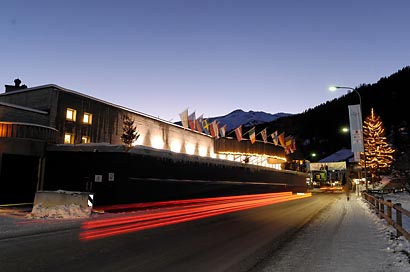
This picture I took just a couple of weeks ago. It shows the Congress Center in Davos where the World Economic Forum will take place next week. Hopefully this is suitable for testing on available-light-shots. With this lighting, we have to be aware of complementary colors (deep blue sky and yellow lights) as well as of deep shadows. I was surprised to see only one software interpreting the blue sky correctly.
It is Image Editor´s result that almost look identical to what I had manually modified the picture to. Overall nice and correct colors, good details in the shadows: Perfect! All other apps tend to put more reds in my photo. Judging from contrast and shadows, DxO is second to best. Despite the color of the sky it´s very close to my own result. Same goes for FixFoto except for being darker and thus losing details in the shadows. Intellihance´s file is the other way round: It´s too light for my opinion. Though Xe847 tints everything yellow, I prefer it over PhotoPerfect´s result, which has acceptable colors but is too high in contrast and too dark in the shadows. Here are the results, ordered from best to worst:
Image Editor:

DxO:
FixFoto:

Intellihance Pro:

Xe847:

PhotoPerfect:

And here´s the updated charts after running 2 tests:
- Image Editor: 12
- FixFoto: 11
- PhotoPerfect: 5
- Intellihance Pro: 6
- Xe847 ProPlus Plug-in: 8
- DxO Optics Pro: 14
Back to Part 1, Sunlight?
Proceed to Part 3, Indoor/Mixed light?
 Till Erdmenger – Businessfotos | Blog
Antwort zu „Automatic Image Optimization: Part 2, Available Light“
[…] Back to Part 2, Available Light? Proceed to Part 4, Studio? No Comments so far Leave a comment RSS feed for comments on this post. TrackBack URI Leave a comment Line and paragraph breaks automatic, e-mail address never displayed, HTML allowed: <a href="" title=""> <abbr title=""> <acronym title=""> <b> <blockquote cite=""> <cite> <code> <del datetime=""> <em> <i> <q cite=""> <strike> <strong> […]